GSPro and Awesome Golf explained—from colorful target games to team scrambles and full course rounds.
A real golf swing can sink a boat, knock down a tower or set up your team's next shot. The right game starts with the people playing: their experience, the kind of gathering and how long they want to take a turn.
By Infinite Golf · Updated Gameplay reference and event-planning recommendations
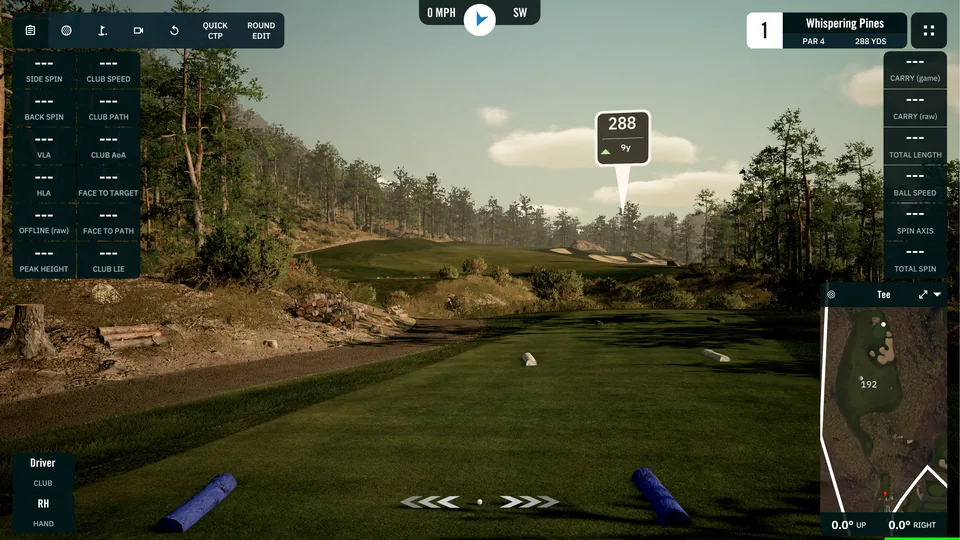
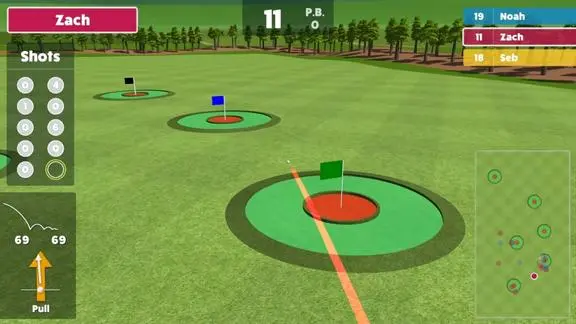
Course gameplay image from GSProTarget Golf gameplay from Awesome Golf
01 · Start with your guests
What should we play?
These are starting recommendations for planning your event. An easy-to-explain objective and a comfortable target distance matter more than choosing the hardest challenge.
Kids & first-timers
Try Super Splash for pool targets or Wrecking Balls for falling towers. Give guests a demonstration and a chance to get comfortable.
Choose your package and your play preference separately. Birdie and Eagle determine the setup, staffing and presentation. GSPro and Awesome Golf provide the playing options. See the packages and software choices.
Know what you're choosing
One simulator. Different ways to play.
The software menus mix several kinds of choices. Understanding the difference makes the catalogue easier to use.
A game or challenge
A specific objective, such as sinking boats, hitting targets or finishing nearest a flag.
A scoring or team format
A way to play a course: count individual strokes, compete hole by hole or share a team score.
A practice tool
A place to rehearse shots, compare club distances or work through a skills test.
A setting
A choice within a game, such as tees, difficulty, holes, mulligans or putting approach.
You do not need to learn the whole catalogue to book. Pick the experiences that sound right for your guests and discuss them with Infinite Golf.
Awesome Golf: games, challenges and course play
Awesome Golf has 13 core modes in four groups: Shootouts, Challenges, Range and Virtual Golf. Some give guests a points contest; others support practice or a round together. The event suggestions below are recommendations for choosing a format. Match the game, difficulty and player rotation to your guests before play begins.
Shootouts: four games with a playful objective
Super Splash
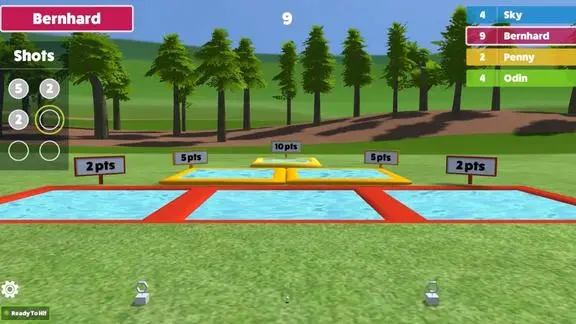
Chip into inflatable pools to collect points. More distant pools are worth more, and a shot can bounce off a pool's sides. Each player has six shots, taking two before the next player steps in. The highest total wins. For a family gathering or guests learning to chip, consider an easier difficulty and explain the closer targets first. Super Splash rules.
Super Splash gameplay from Awesome Golf.
Boat Blast
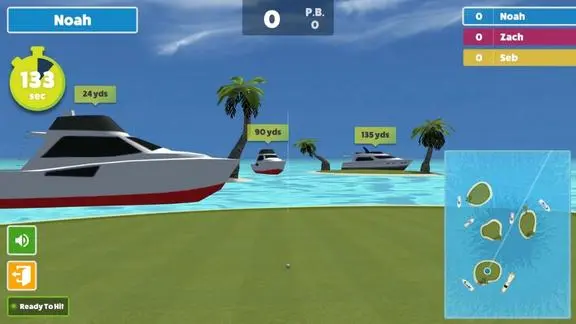
Sink boats around the islands before time expires. Each boat earns 10 points, with bonus points for clearing them all early. The clock starts with the first shot; players can keep hitting until time runs out. Each player finishes the timed round before the next begins. Easy difficulty uses stationary boats. Consider this for guests who enjoy choosing targets, and plan the queue around complete timed turns. Boat Blast rules.
Boat Blast gameplay from Awesome Golf.
Wrecking Balls
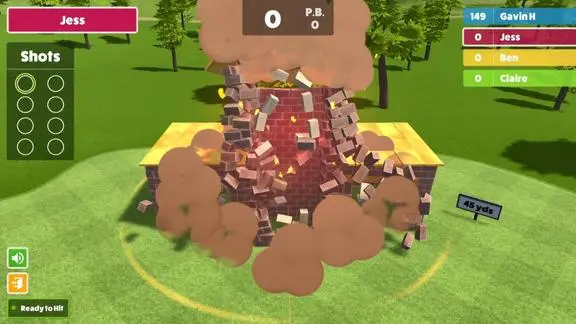
Hit brick structures and score for the destruction. Gold bricks can trigger a larger collapse, giving players a reason to think about where they aim. There are eight shots at eight structures, with two shots per player turn. Difficulty changes the target distances. We suggest this when you want a party game's objective to be immediately visible: aim, strike and watch the structure fall. Wrecking Balls rules.
Wrecking Balls gameplay from Awesome Golf.
Get in the Hole
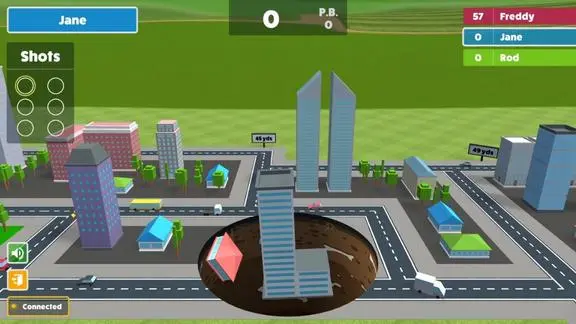
Pitch shots open sinkholes beneath a city. Buildings swallowed by the holes earn points, with larger structures worth more. Players receive six shots and take two at a time before switching. The highest score wins. Consider this for guests who like choosing a valuable target and seeing the result unfold; demonstrate the pitching objective before their first turn. Get in the Hole rules.
Get in the Hole gameplay from Awesome Golf.
Challenges: four ways to compete on golf shots
Closest to the Pin
Aim at a flag and try to leave the ball nearest the hole. Current rules give each player four attempts, with two shots per turn, following the change introduced in version 3.8. This is a useful choice for an accuracy contest because the winning objective is easy to explain. Choose a target distance that makes sense for the people taking part. Closest to the Pin rule update.
Longest Drive
Hit the longest shot that finishes inside the scoring grid. Each player gets four attempts in two-shot turns, so a powerful shot still needs a valid finish. For a distance contest, decide how to group participants before the competition starts. Separate ability groups may make more sense than asking every guest to chase the same result. Longest Drive rules.
Target Golf
Pick among targets at different distances and build a points total across eight shots, taking two per turn. Farther targets and their inner rings reward more points. Players must weigh a reachable target against a more ambitious shot. We suggest Target Golf for a mixed group that would enjoy choosing its own approach to the same scoring challenge. Target Golf rules.
Skills Challenge
Score by landing near a target that moves farther away after every two attempts. Players have ten shots in two-shot turns. Difficulty applies to the whole group; the hard setting requires shots to pass through goalposts. Consider this for golfers who want a progression of accuracy tests, and agree on the shared difficulty before starting. Skills Challenge rules.
Range: four ways to practice
These are practice modes within Awesome Golf Simulator. For an event, give each guest an agreed turn length or shot allowance.
Shot-by-Shot
Hit practice shots and review their flight and measurements, such as distance and ball speed. Overview and Detail are different views of the same session. There is no fixed winning score. Consider it for warming up or introducing a guest to the simulator before choosing a game. Shot-by-Shot reference.
Approach Shots
Practice reaching greens from different distances while tracking shots taken, greens hit and success percentage. Pin Shuffle can change the target after a chosen number of attempts. This suits a focused accuracy exercise; agree on the target range and session length when planning a golfer gathering. Approach Shots reference.
Club Distances
Hit a selected number of shots with each club to compare average distances and shot spread. A consistency score reflects how tightly the shots group together. Consider it for golfers curious about the gaps between their clubs, with time reserved for completing the chosen set. Club Distances reference.
Coaching
Review shot information and compare groups of swings, clubs or technique changes. This is an analysis session without a standard winning score. It may suit a planned instruction segment; discuss instructor and equipment needs when planning it. The measurements and video features available depend on the connected equipment and supported options. Coaching reference.
Virtual Golf: one mode with scoring and team choices
Play a course or select particular holes. For an event, consider a small, planned group and agree on the holes before starting. Add everyone before the round begins.
Choose how scores decide the result:
Stroke Play: the lowest total number of strokes wins.
Match Play: compete to win individual holes.
Skins: an outright lowest score wins the hole's skin; ties carry it forward.
Then choose how players participate:
Individual: each player records their own score.
Scramble: everyone hits, the team chooses its best position, and everyone plays from there.
Better Ball: teammates play their own balls; the team's lowest score counts on each hole.
Alternate Shots: partners share one ball and alternate shots, including who tees off.
Available combinations depend on player count and scoring choice. Scramble is worth considering when you want a shared team objective. Tee positions, mulligans and timers are settings within this mode. Virtual Golf formats and course options.
What about the Competitions button?
Competitions use existing games for online leaderboards. They require internet connectivity for entries to save, and public display depends on account and privacy choices. They are separate from a contest you arrange for your own guests. Discuss online competition requirements when planning the event. Official competition guidance.
GSPro: course golf, team formats and skills challenges
GSPro gives golf fans several ways to compete, from a shared scramble to a closest-to-the-pin contest. It also offers practice areas for guests who would rather take a few swings than keep a scorecard. Start with the experience you want, then choose the format: a social team game, an individual challenge or a longer round.
Seven ways to score a course round
These formats change how a round is played and scored. For a party with a mix of golfers and newcomers, consider Scramble first; for a golf-focused gathering, the individual formats offer more room for competition.
Scramble
Everyone plays from the selected shot. Repeat together until the hole is finished.
Best Ball
Each player finishes the hole. In this example, the team's score is 4.
Shamble
Choose a drive together. Each golfer plays their own ball from that position.
Stroke Play
Count each golfer's strokes across the holes played; the lowest total wins. A familiar option for guests who enjoy individual competition.
Scramble
Everyone on a team hits, the team selects a shot, and everyone plays again from that position. Repeat until the hole is finished. The shared score gives a mixed-experience team a common goal.
Match Play
Compete to win individual holes. A rough hole costs that hole rather than adding a large number to a round total. A natural fit for a friendly head-to-head contest.
Alternate Shot (Stroke)
Partners take turns hitting the same ball and count their team's strokes. Each player faces the shot a teammate has left, giving the round a cooperative challenge.
Best Ball
Each golfer plays their own ball through the hole, and the team's lowest individual score counts. This suits golfers who want their own round while contributing to a team result.
Stableford
Scores earn points according to their relationship to par, with more points for better results. A useful variation for regular golfers who want a different scoring system.
Shamble
The team chooses a tee shot, then golfers play their own balls from that position. It combines a shared start with individual play for the rest of the hole.
The format names above follow GSPro's Local Match guide. Agree on team sizes and scoring before the first shot so everyone knows what counts.
Practice areas with games inside them
A practice session can be an activity in its own right. These choices suit warm-ups, casual swings and focused challenges without committing everyone to a course round.
Driving Range
Hit toward adjustable targets. A simple starting point for guests who want to try the simulator or find a comfortable club.
Dynamic Holes: Builder and Random
Builder lets you arrange a practice hole; Random changes the setup within selected limits. Both add variety for golfers interested in approach shots.
The Playground
Choose among preset ball and pin positions. It offers variety for a relaxed session without building each practice shot yourself.
Ladder Challenge
Work through target distances by meeting the required number of successful shots. A good option for golfers who enjoy a clear progression.
Multiplayer Rounds and Elimination
Rounds gives every player their allotted shots in each round. Elimination removes the player with the worst result each round until one remains. Scoring can use Best, Sum or Average. Rounds keeps everyone participating; Elimination creates a knockout finish.
On Course Practice lets golfers repeat a shot from a chosen position on a course. Quick CTP, or Closest To the Pin, adds a proximity contest in both practice areas: qualifying shots on the green are ranked by distance from the hole. It is a straightforward option to discuss for a party or fundraiser. Player names are entered on the board manually, so agree on attempts and scorekeeping before starting. See GSPro's On Course Practice guide.
Five choices in the Challenges menu
Some challenges are easy to understand at a glance; others reward a longer, more focused session. Match the choice to your guests' interest in golf and the time you want them to spend playing.
Ultimate Long Drive
Compete for the longest drive that stays inside the target area. Shot limits, time and grid width can be adjusted. Distance contests give confident hitters a clear target; pairing one with an accuracy game offers guests another way to compete. Ultimate Long Drive details.
Distance Challenges
Choose a preset distance and try to finish shots close to the hole. GSPro documents 15 challenges, from very short shots to 250 yards, with proximity and skills scoring. For an event, choose a distance that fits the group and the available setup. Distance Challenges details.
Custom Skills Test
Play a collection of selected shots, such as approaches or tricky recovery positions. There are preloaded tests, and additional tests can be created or shared. A golf-focused gathering could build an activity around a particular shot; a custom test needs preparation before the event. Custom Skills Test details.
60 Shot Skills Test
Also labeled Standard Skills Test in the documentation, this Full Bag test covers multiple distances over 60 shots. Distances can follow a fixed or random order. It suits a dedicated practice session better than a busy party where guests want brief turns. 60 Shot Skills Test details.
Operation 36 Golf
Play nine-hole levels on selected courses, aiming for par or better as the challenge progresses through ten levels. Guests who enjoy working toward a golf goal have a progression to follow. Its longer structure fits a planned session better than a quick walk-up contest. Operation 36 details.
Other ways to play and adjust a round
Ghost Play adds a recorded 18-hole Stroke Play performance as an opponent in a local match. Online Match connects players in different locations. Simulator Golf Tour tournaments involve account registration and event-specific rules. These are additional ways to participate, with arrangements beyond a simple party contest.
Selected holes, tees, mulligans and putting settings shape a round without creating a new game format. The putting approach depends on the setup. When planning your rental, tell Infinite Golf which games interest you so the format and arrangements can be confirmed for your event.
Make it work for your gathering
Build a simple game plan.
For an event where guests come and go, start with one clearly explained target game. A small group gathering specifically to play golf can give a team round more attention. The number of names a game accepts is not a promise of how many guests one simulator can serve.
Choose one main experience. A target contest, a playful Shootout or a course round gives the event a clear starting point. Keep a second choice ready if the group's interests change.
Agree on the turns. Confirm the practice allowance, scored attempts, player order and ties. Use the game's actual round structure; Boat Blast's timed round is different from a two-shot rotation.
Match the difficulty to the guests. Ask about target distance and tee choices. Offer an accuracy option alongside a distance contest, and let people decide what they want to play.
Separate the game score from event administration. Prizes, donations, teams and sponsor recognition belong in the event plan. Do not assume a software leaderboard handles those jobs.
Leave room to finish. Stop adding rounds when the event is winding down. The right game should fit around food, presentations and the rest of your gathering.
Which golf simulator games are good for beginners?
Start with a visible, simple objective: Super Splash's pools, Wrecking Balls' towers or a comfortable target in Target Golf. The host can help choose settings and explain the turn. For team course play, a Scramble lets everyone contribute while the group chooses which shot to use.
Can we play a Scramble in both GSPro and Awesome Golf?
Yes. GSPro lists Scramble among its course formats, and Awesome Golf offers it within Virtual Golf. The common idea is to select a teammate's shot position and play together from there. Confirm the team setup and holes for your event.
Is Get in the Hole a putting game?
Awesome Golf's Get in the Hole is a pitching game. Shots create sinkholes that swallow buildings for points. Its name describes the game world, rather than a conventional putting contest.
Do we have to play a full 18-hole round?
No. Both programs provide target or challenge activities as well as course play. Course settings also let you plan a shorter selection of holes. Choose the format around your guests and the available playing time.
How does putting work on a simulator?
Putting depends on the launch monitor and software settings. GSPro offers automatic and manually entered putting options as alternatives to tracking putts. Ask how the event setup will finish a hole so everyone plays under the same rules.
Are the software choices separate rental packages?
No. Birdie and Eagle are Infinite Golf's rental packages. GSPro and Awesome Golf are play preferences for either package. Tell us the games you like when requesting a quote; we can match the format to the gathering.
Sources & software updates.
This guide was checked against official software documentation on October 4, 2026. The mode descriptions explain documented features; the event suggestions are Infinite Golf's planning recommendations. Gameplay images are supplied by the software publishers and may show an earlier interface. The scoring diagrams are explanatory illustrations.
Menu names and rules can change with updates. Public-beta additions are labeled separately in the GSPro section. For a specific contest, confirm the game's settings and the event arrangements before announcing rules to your guests.
Bring your favorite game to the event
Tell us what your guests would love to play.
Planning a party, company gathering or fundraiser in Southwest Missouri? Share the date, venue and rough group size. Add a software preference—or let us help you choose.